> ## Documentation Index
> Fetch the complete documentation index at: https://docs.forestreet.com/llms.txt
> Use this file to discover all available pages before exploring further.

# Export via API

> Connect a market to your internal system using an API hook.

<Tip>
  This section is about an ***client supplied*** endpoint that Forestreet platform
  will send a `POST` request to.

  The **Request** section describes the body of the `POST` request that will be
  sent to your API, and the **Response** section describes the expected response
  from your API.
</Tip>

Forestreet Platform allows users to initiate an API call to export a market to their internal system. This feature is
useful for users with real time data integration requirements, without the need for exporting and importing data
manually.

The workflow is as follows:

<Steps>
  <Step title="Register Endpoint">
    Each team will be able to register a number of endpoints with Forestreet.

    All endpoints must be `POST` endpoints, and must be able to accept a JSON body.

    <Note>
      Refer to the [Register Endpoint](#to-register-an-endpoint)
      section below for the details of the endpoint registration.
    </Note>
  </Step>

  <Step title="User create studies">
    Users in your Team shall use the Forestreet platform to create markets and
    publish them as required.

    Using the Market Collection feature, users can group markets together for different
    projects or sub-teams etc.
  </Step>

  <Step title="Export to API">
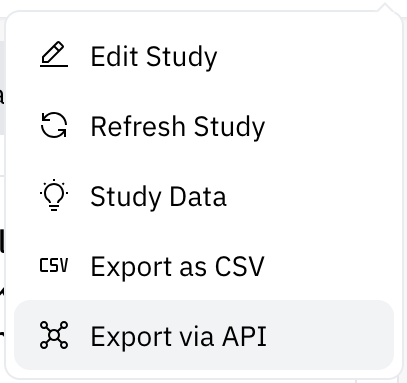
    After publishing a market, users can select the market and choose to export it
    via the **Export to API** feature:

    <Frame caption="This will be visible if API endpoints are registered for the team.">
      <img width="200" src="https://mintcdn.com/forestreet/pahclZuClwwwBpfa/api-reference/guides/img/export-api.png?fit=max&auto=format&n=pahclZuClwwwBpfa&q=85&s=f3d3c44001d4a6cfccfa477326a80b73" data-path="api-reference/guides/img/export-api.png" />
    </Frame>
  </Step>

  <Step title="Choose the endpoint">
    All the registered endpoints for the Team will be displayed in a dropdown list, and
    the user can select the desired endpoint to export the market to.

    The description will be displayed to the user to help them choose the correct endpoint,
    and the user can click on the **Export** button to initiate the API call.

    <Note>See the [**Request Body sent to your API**](#post-body-to-your-api) section for the expected body of the `POST` request.</Note>
  </Step>

  <Step title="Choose companies">
    The user have 3 possible set of companies to export:

    * **Export all companies**: All companies in this market will be exported.
    * **Export filtered companies**: Only companies that are currently visible to the user on the Market Explorer will be exported.
      This takes into account filters and pagination applied by the user.
          <Tip>
            This implies that the maximum number of companies exportable will be the selected
            page size of the Market Explorer.
          </Tip>
    * **Export only selected companies**: When this option is selected, a list of companies will be shown
      to the user, and they can select the companies they want to export.
  </Step>

  <Step title="Endpoint Response">
    Depending on the Status Code returned by your API, the user will be shown a success
    or failure message.

    <CardGroup cols={1}>
      <Card title="Success" icon="thumbs-up">
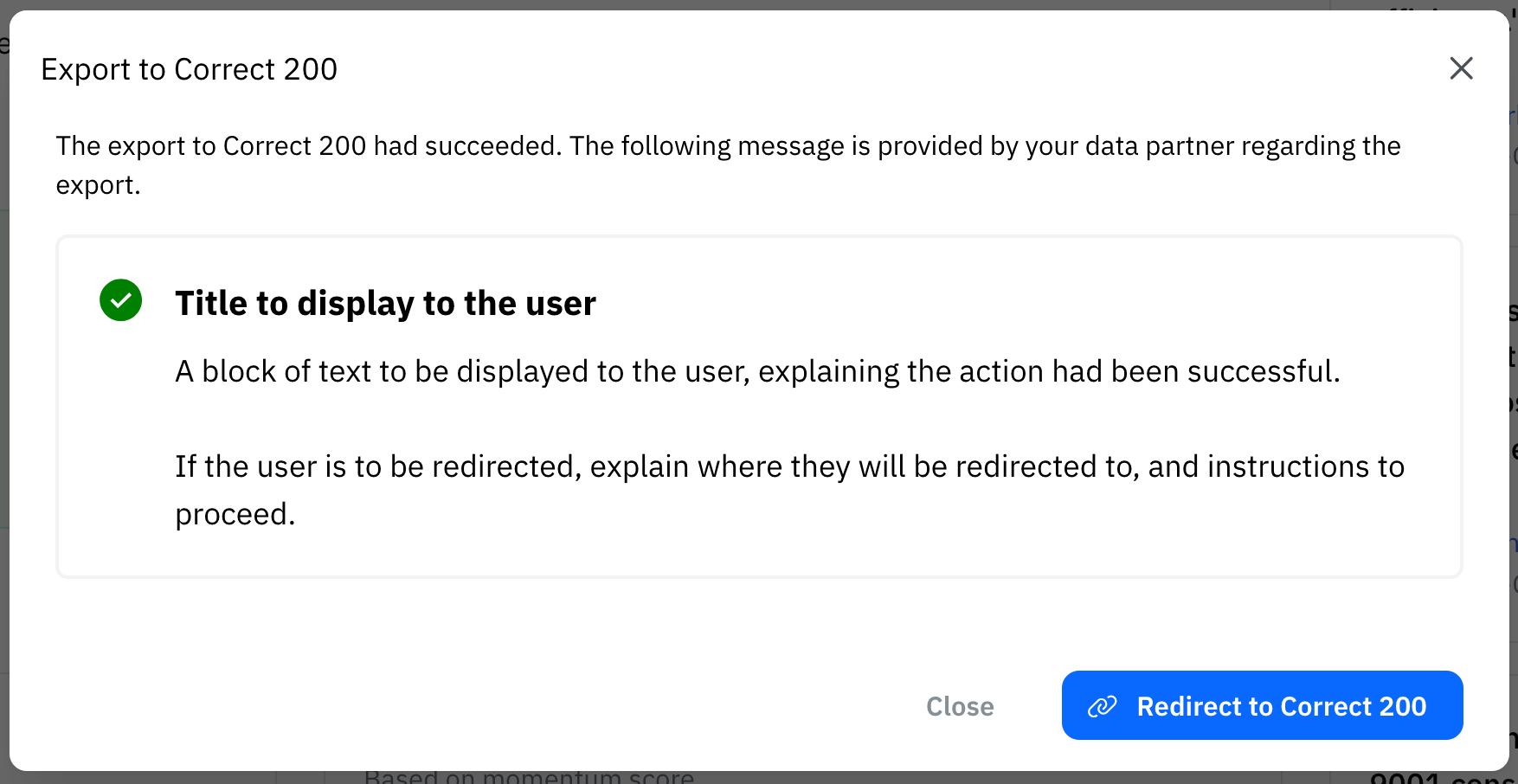
        If successful, the user will be shown a title and message that you provide.

        If a redirect URL is provided, the user will be redirected to that URL after 5 seconds.
      </Card>

      <Card title="Failure" icon="thumbs-down">
        If your API returns a `400`-`499` status code **or a `207`**, the user will be shown a title, message,
        and - optionally - a list of references. Each reference must include a `title`; `message`, `url`, and `type`
        (`ok` | `info` | `warning` | `error`, default `warning`) are optional. The UI renders references as
        collapsible rows with icons (✅/ℹ️/⚠️/🚫), supports long lists with scrolling, and only expands when `message` or `url` is present.
      </Card>

      <Card title="Error" icon="circle-exclamation">
        If your API does not respond within 15 seconds, or the connection was closed, or
        the return status code was `500`-`599`, we will try again for a maximum of 3 times.
        The user will be shown a generic error message, referring them to contact their IT support.
      </Card>
    </CardGroup>
  </Step>
</Steps>

### To Register an Endpoint

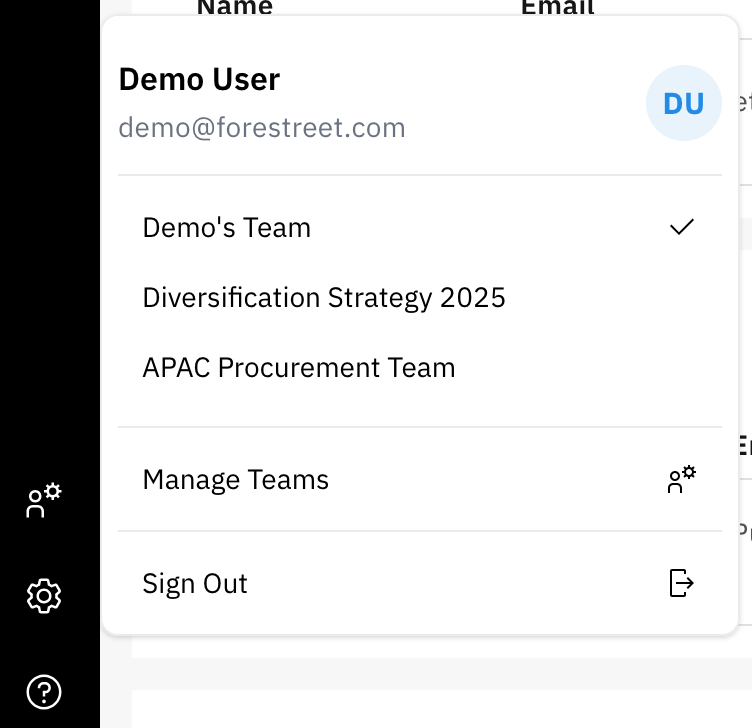
Endpoints are attached to a Team, and can be registered via the "Manage Teams" feature.

<Steps>
  <Step title="Register Endpoint">
    To register an endpoint, you must be a Team Admin or have the appropriate permissions
    to manage teams.

    <Frame caption="Settings Tab">
      <img width="200" src="https://mintcdn.com/forestreet/pahclZuClwwwBpfa/api-reference/guides/img/team-selection.png?fit=max&auto=format&n=pahclZuClwwwBpfa&q=85&s=06b1f89d2e15737ba67e3cc8b0ba0de1" data-path="api-reference/guides/img/team-selection.png" />
    </Frame>
  </Step>

  <Step title="Navigate to Manage Teams">
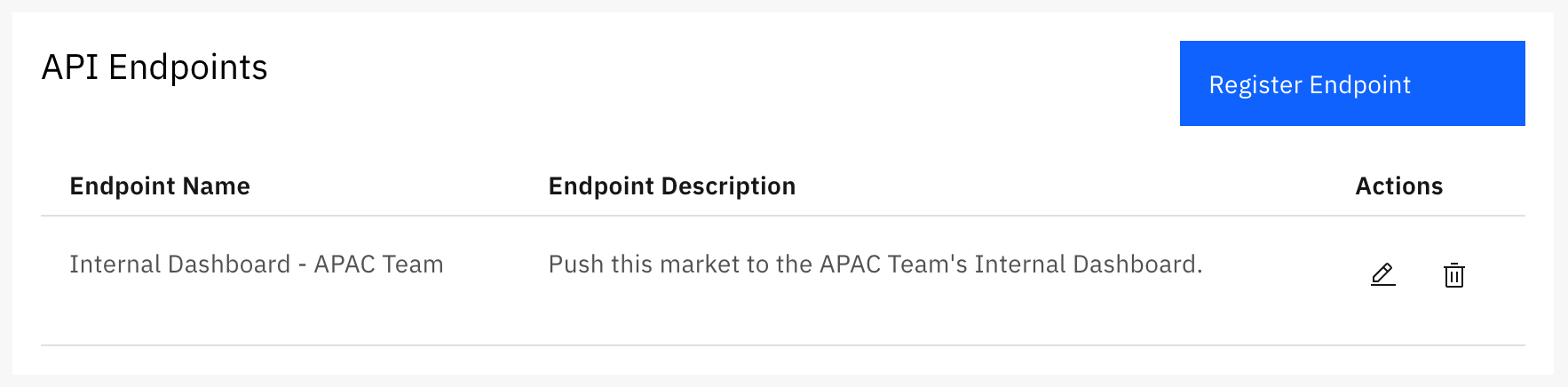
    Navigate to the **Manage Teams** section in the Forestreet platform.

    <Frame caption="API Endpoints Section">
      <img width="400" src="https://mintcdn.com/forestreet/pahclZuClwwwBpfa/api-reference/guides/img/list-of-endpoints.png?fit=max&auto=format&n=pahclZuClwwwBpfa&q=85&s=50d30d7a6241beb19b00fa81ab91b157" data-path="api-reference/guides/img/list-of-endpoints.png" />
    </Frame>
  </Step>

  <Step title="API Endpoints Section">
    In the **API Endpoints** section, you can view existing endpoints and register new ones.
  </Step>

  <Step title="Register Endpoint Form">
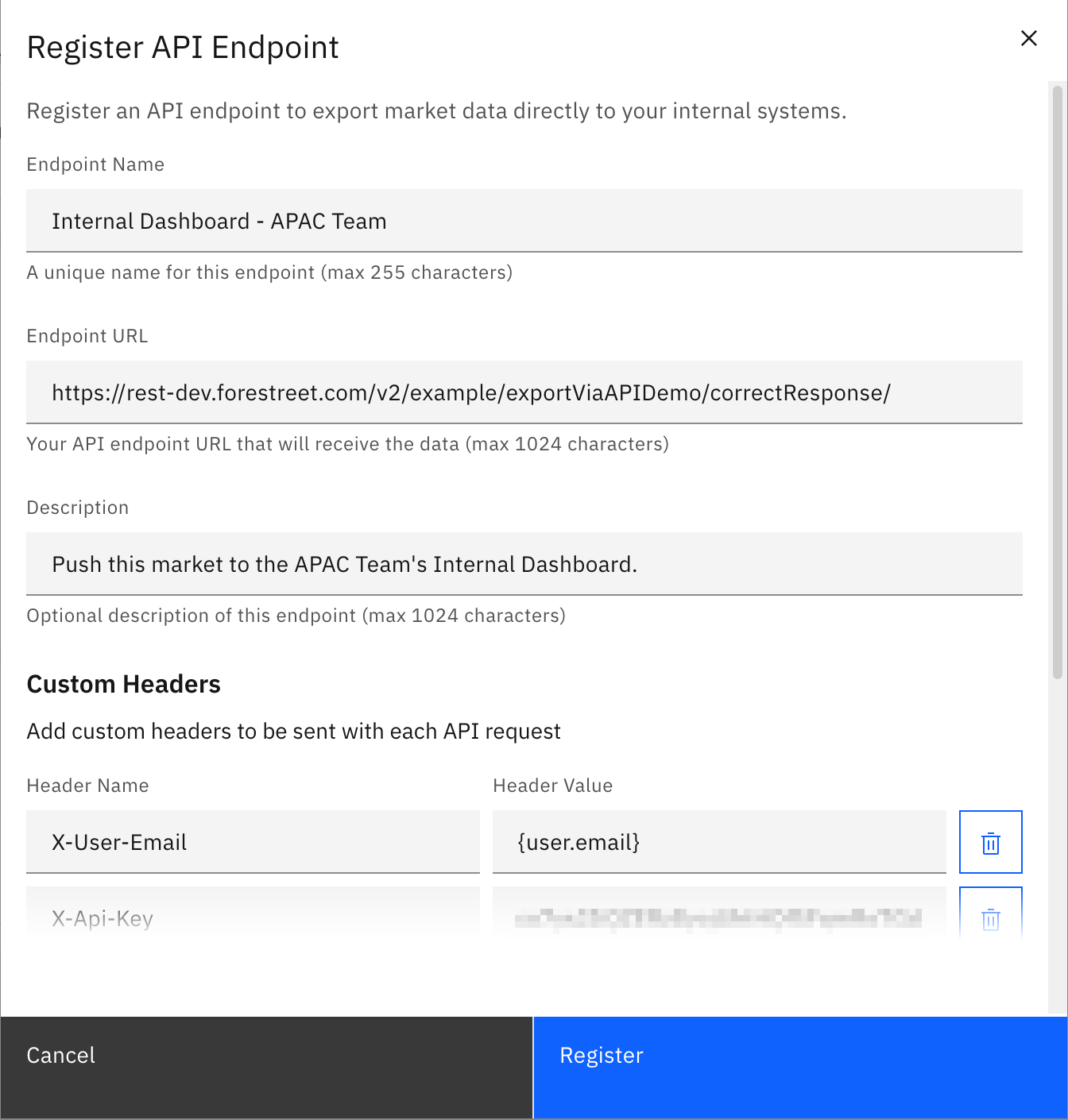
    Click on the **Register Endpoint** button and fill in the required details.

    <Frame caption="Register Endpoint Form">
      <img width="400" src="https://mintcdn.com/forestreet/pahclZuClwwwBpfa/api-reference/guides/img/register-endpoint.png?fit=max&auto=format&n=pahclZuClwwwBpfa&q=85&s=08f51f97c56cbeea70a7ce6cfa190e8b" data-path="api-reference/guides/img/register-endpoint.png" />
    </Frame>

    <Note>
      The name of the endpoint must be unique within the Team, and cannot be changed
      after it has been registered. If you need to change the name, you must delete the
      endpoint and register a new one with the desired name.
    </Note>
  </Step>

  <Step title="Submit the Form">
    After filling in the details, click on the **Register** button to save the endpoint.
  </Step>
</Steps>

<Accordion title="Endpoint metadata">
  Each endpoint can be registered with the following details:

  <ParamField path="name" type="string" required>
    A unique name for the endpoint that will be displayed to the user.

    <Tip>The maximum allowed length is 255 characters.</Tip>
  </ParamField>

  <ParamField path="url" type="string" required>
    A valid URL that Forestreet can send a `POST` request to.

    This can include any path, query parameters, or headers that your API requires.

    This URL must be accessible from the internet, and must not require any special
    authentication or headers to be sent by Forestreet.

    ```URL Example theme={null}
    https://your-internal-system.com/api/v1/forestreet-export?teamId=1234&userEmail={user.email}
    ```

    The following placeholder variables can be used:

    | Variable     | Description                                             |
    | ------------ | ------------------------------------------------------- |
    | `user.name`  | The full name of the user who initiated the export.     |
    | `user.email` | The email address of the user who initiated the export. |

    These placeholder variables will be resolved at the point of export by Forestreet.

    <Tip>The maximum allowed length is 1,024 characters.</Tip>
  </ParamField>

  <ParamField path="description" type="string" required>
    A one-line description of the endpoint that will be displayed to the user.

    <Tip>The maximum allowed length is 1,024 characters.</Tip>
  </ParamField>

  <ParamField path="headers" type="object">
    A JSON object containing any headers that your API requires.

    These headers will be sent with every request to this endpoint, and is useful
    for any authentication or API keys that your API requires.

    A minimum set of headers will be sent regardless of what is provided. **These
    cannot be overridden.**:

    * `Content-Type`: always `application/json`
    * `Idempotency-Key`: a UUID that is unique for each request. Upon error, all
      retry requests will use the same `Idempotency-Key`.

    ```JSON Example Headers theme={null}
    {
        "X-Api-Key": "your-api-key"
    }
    ```
  </ParamField>
</Accordion>

## `POST` Body to your API

After the user had chosen the endpoint and clicked on the **Export** button, Forestreet will send a `POST` request to
the URL provided in the endpoint registration.

An example body of the `POST` request is shown on the right, to illustrate the structure of the data that will be sent
to your API.

<Note>
  Unfortunately we cannot provide any IP ranges for whitelisting, as our servers could be run globally from all AWS
  regions.
</Note>

This is equivalent to the [Response](/api-reference/market/companies/companies#response) from the Companies endpoint,
with the following `fields` selected:

```JSON Equivalent Companies Request theme={null}
{
    "page": 1,
    "itemsPerPage": 500,
    "sorts": {
        "score": "desc"
    },
    "fields": [
        "domain",
        "score",
        "name",
        "description",
        "overallMomentum",
        "contactNumber",
        "contactEmail",
        "actualRevenue",
        "naics",
        "operatesIn",
        "dunsNumbers"
    ]
}
```

<Tip>
  The maximum number of companies that will be sent is 500. If more companies are required, use the `market.id` to query
  the [Market/Companies](/api-reference/market/companies/companies) endpoint for paginated results.
</Tip>

<RequestExample>
  ```JSON Request Body sent to your API theme={null}
  {
      "meta": {
          "totalItems": 3
      },
      "market": {
          "id": 2,
          "name": "Transcription Services"
      },
      "data": [
          {
              "domain": "ibm.com",
              "name": "IBM",
              "description": "International Business Machines Corporation (IBM) provides computer solutions. The Company offers application, technology consulting and support, process design and operations, cloud, digital workplace, and network services, as well as business resiliency, strategy, and design solutions. IBM serves clients worldwide.",
              "overallMomentum": 48,
              "contactNumber": "+1 914-499-1900",
              "contactEmail": "ews@us.ibm.com",
              "actualRevenue": 60530000000,
              "naics": [
                  {
                      "code": "518210",
                      "name": "Computing Infrastructure Providers, Data Processing, Web Hosting, and Related Services",
                      "level": 4,
                      "isPrimary": true
                  },
                  {
                      "code": "518200",
                      "name": "Computing Infrastructure Providers, Data Processing, Web Hosting, and Related Services",
                      "level": 3,
                      "isPrimary": true
                  },
                  {
                      "code": "518000",
                      "name": "Computing Infrastructure Providers, Data Processing, Web Hosting, and Related Services",
                      "level": 2,
                      "isPrimary": true
                  },
                  {
                      "code": "510000",
                      "name": "Information",
                      "level": 1,
                      "isPrimary": true
                  },
                  {
                      "code": "334111",
                      "name": "Electronic Computer Manufacturing",
                      "level": 5,
                      "isPrimary": false
                  },
                  {
                      "code": "334112",
                      "name": "Computer Storage Device Manufacturing",
                      "level": 5,
                      "isPrimary": false
                  },
                  {
                      "code": "335000",
                      "name": "Electrical Equipment, Appliance, and Component Manufacturing",
                      "level": 2,
                      "isPrimary": false
                  },
                  {
                      "code": "334419",
                      "name": "Other Electronic Component Manufacturing",
                      "level": 5,
                      "isPrimary": false
                  },
                  {
                      "code": "330000",
                      "name": "Manufacturing",
                      "level": 1,
                      "isPrimary": false
                  },
                  {
                      "code": "541618",
                      "name": "Other Management Consulting Services",
                      "level": 5,
                      "isPrimary": false
                  },
                  {
                      "code": "541610",
                      "name": "Management Consulting Services",
                      "level": 4,
                      "isPrimary": false
                  },
                  {
                      "code": "334410",
                      "name": "Semiconductor and Other Electronic Component Manufacturing",
                      "level": 4,
                      "isPrimary": false
                  },
                  {
                      "code": "541600",
                      "name": "Management, Scientific, and Technical Consulting Services",
                      "level": 3,
                      "isPrimary": false
                  },
                  {
                      "code": "334400",
                      "name": "Semiconductor and Other Electronic Component Manufacturing",
                      "level": 3,
                      "isPrimary": false
                  },
                  {
                      "code": "541000",
                      "name": "Professional, Scientific, and Technical Services",
                      "level": 2,
                      "isPrimary": false
                  },
                  {
                      "code": "540000",
                      "name": "Professional, Scientific, and Technical Services",
                      "level": 1,
                      "isPrimary": false
                  },
                  {
                      "code": "334110",
                      "name": "Computer and Peripheral Equipment Manufacturing",
                      "level": 4,
                      "isPrimary": false
                  },
                  {
                      "code": "334100",
                      "name": "Computer and Peripheral Equipment Manufacturing",
                      "level": 3,
                      "isPrimary": false
                  },
                  {
                      "code": "334000",
                      "name": "Computer and Electronic Product Manufacturing",
                      "level": 2,
                      "isPrimary": false
                  },
                  {
                      "code": "513210",
                      "name": "Software Publishers",
                      "level": 4,
                      "isPrimary": false
                  },
                  {
                      "code": "513200",
                      "name": "Software Publishers",
                      "level": 3,
                      "isPrimary": false
                  },
                  {
                      "code": "513000",
                      "name": "Publishing Industries",
                      "level": 2,
                      "isPrimary": false
                  }
              ],
              "operatesIn": ["us", "ca", "gb", "de", "fr", "in", "jp", "br", "au", "mx", "cn", "it", "es", "nl", "kr", "ch", "se", "sg", "ae", "za"],
              "dunsNumbers": ["123456789"]
          },
          {
              "domain": "pindrop.com",
              "name": "Pindrop",
              "description": "Pindrop Security, Inc. develops and markets security software. The Company offers a caller identification product that helps detect, report, and mitigate phone frauds. Pindrop Security serves the finance and banking industry in the United States.",
              "overallMomentum": 59,
              "contactNumber": "+1 866-245-4045",
              "contactEmail": "info@pindrop.com",
              "actualRevenue": 49000000,
              "naics": [
                  {
                      "code": "541511",
                      "name": "Custom Computer Programming Services",
                      "level": 5,
                      "isPrimary": true
                  },
                  {
                      "code": "541510",
                      "name": "Computer Systems Design and Related Services",
                      "level": 4,
                      "isPrimary": true
                  },
                  {
                      "code": "541500",
                      "name": "Computer Systems Design and Related Services",
                      "level": 3,
                      "isPrimary": true
                  },
                  {
                      "code": "541000",
                      "name": "Professional, Scientific, and Technical Services",
                      "level": 2,
                      "isPrimary": true
                  },
                  {
                      "code": "540000",
                      "name": "Professional, Scientific, and Technical Services",
                      "level": 1,
                      "isPrimary": true
                  },
                  {
                      "code": "561612",
                      "name": "Security Guards and Patrol Services",
                      "level": 5,
                      "isPrimary": false
                  },
                  {
                      "code": "561610",
                      "name": "Investigation, Guard, and Armored Car Services",
                      "level": 4,
                      "isPrimary": false
                  },
                  {
                      "code": "561600",
                      "name": "Investigation and Security Services",
                      "level": 3,
                      "isPrimary": false
                  },
                  {
                      "code": "561000",
                      "name": "Administrative and Support Services",
                      "level": 2,
                      "isPrimary": false
                  },
                  {
                      "code": "560000",
                      "name": "Administrative and Support and Waste Management and Remediation Services",
                      "level": 1,
                      "isPrimary": false
                  },
                  {
                      "code": "513210",
                      "name": "Software Publishers",
                      "level": 4,
                      "isPrimary": false
                  },
                  {
                      "code": "513200",
                      "name": "Software Publishers",
                      "level": 3,
                      "isPrimary": false
                  },
                  {
                      "code": "513000",
                      "name": "Publishing Industries",
                      "level": 2,
                      "isPrimary": false
                  },
                  {
                      "code": "510000",
                      "name": "Information",
                      "level": 1,
                      "isPrimary": false
                  }
              ],
              "operatesIn": ["gb", "us"],
              "dunsNumbers": ["987654321"]
          },
          {
              "domain": "talkatoo.com",
              "name": "Talkatoo",
              "description": "Talkatoo makes and sells dictation software for professionals.Our customers are busy professionals - doctors, veterinarians, and lawyers - who have high hourly bill rates and hectic schedules; their time is valuable. Driven by liability management and professional regulation, their documentation req... Read more",
              "overallMomentum": 29,
              "contactNumber": null,
              "contactEmail": null,
              "actualRevenue": 7000000,
              "naics": [
                  {
                      "code": "513210",
                      "name": "Software Publishers",
                      "level": 4,
                      "isPrimary": true
                  },
                  {
                      "code": "513200",
                      "name": "Software Publishers",
                      "level": 3,
                      "isPrimary": true
                  },
                  {
                      "code": "513000",
                      "name": "Publishing Industries",
                      "level": 2,
                      "isPrimary": true
                  },
                  {
                      "code": "510000",
                      "name": "Information",
                      "level": 1,
                      "isPrimary": true
                  }
              ],
              "operatesIn": ["ca"],
              "dunsNumbers": ["456789123"]
          }
      ]
  }
  ```

  ```TEXT Minimum Headers theme={null}
  Content-Type: application/json
  Idempotency-Key: 123e4567-e89b-12d3-a456-426614174000
  ```
</RequestExample>

## Expected Response from your API

Your API should be constructed to return a JSON object with the following structure:

<ResponseExample>
  ```JSON On Success theme={null}
  {
      "title": "A title to display to the user",
      "message": "A block of text to be displayed to the user, explaining the action had been successful.<br/><br/>If the user is to be redirected, explain where they will be redirected to, and instructions to proceed.",
      "redirectUrl": "https://your-internal-system.com/redirect-url"
  }
  ```

  ```JSON On Failure theme={null}
  {
      "title": "A title to display to the user",
      "message": "A block of text to be displayed to the user, enclosed in a <pre> tag.",
      "references": [
          {
              "title": "Error Code 123",
              "message": "Detailed explanation of the error",
              "url": "https://your-internal-system.com/docs/error-codes/123",
              "type": "error"
          },
          {
              "title": "Contact IT Support",
              "url": "https://your-internal-system.com/it/contact",
              "type": "info"
          },
          {
              "title": "Simple reference without URL or message"
          }
      ]
  }
  ```
</ResponseExample>

#### On Success

Response status must be `200`, with `Content-Type: application/json` in the header, and a JSON body with the following
schema:

```JSON On Success theme={null}
{
    "title": "A title to display to the user",
    "message": "A block of text to be displayed to the user, explaining the action had been successful.<br/><br/>If the user is to be redirected, explain where they will be redirected to, and instructions to proceed.",
    "redirectUrl": "https://your-internal-system.com/redirect-url"
}
```

<Info>
  The above response will be rendered in a modal dialog to the user as:{" "}

  <img width="400" src="https://mintcdn.com/forestreet/pahclZuClwwwBpfa/api-reference/guides/img/export-success.png?fit=max&auto=format&n=pahclZuClwwwBpfa&q=85&s=e366cc9f036c368dfae966043b7cce8e" data-path="api-reference/guides/img/export-success.png" />
</Info>

If the `redirectUrl` is provided and is not `null`, the user will be redirected to that URL in a new window after 5
seconds.

#### On Failure

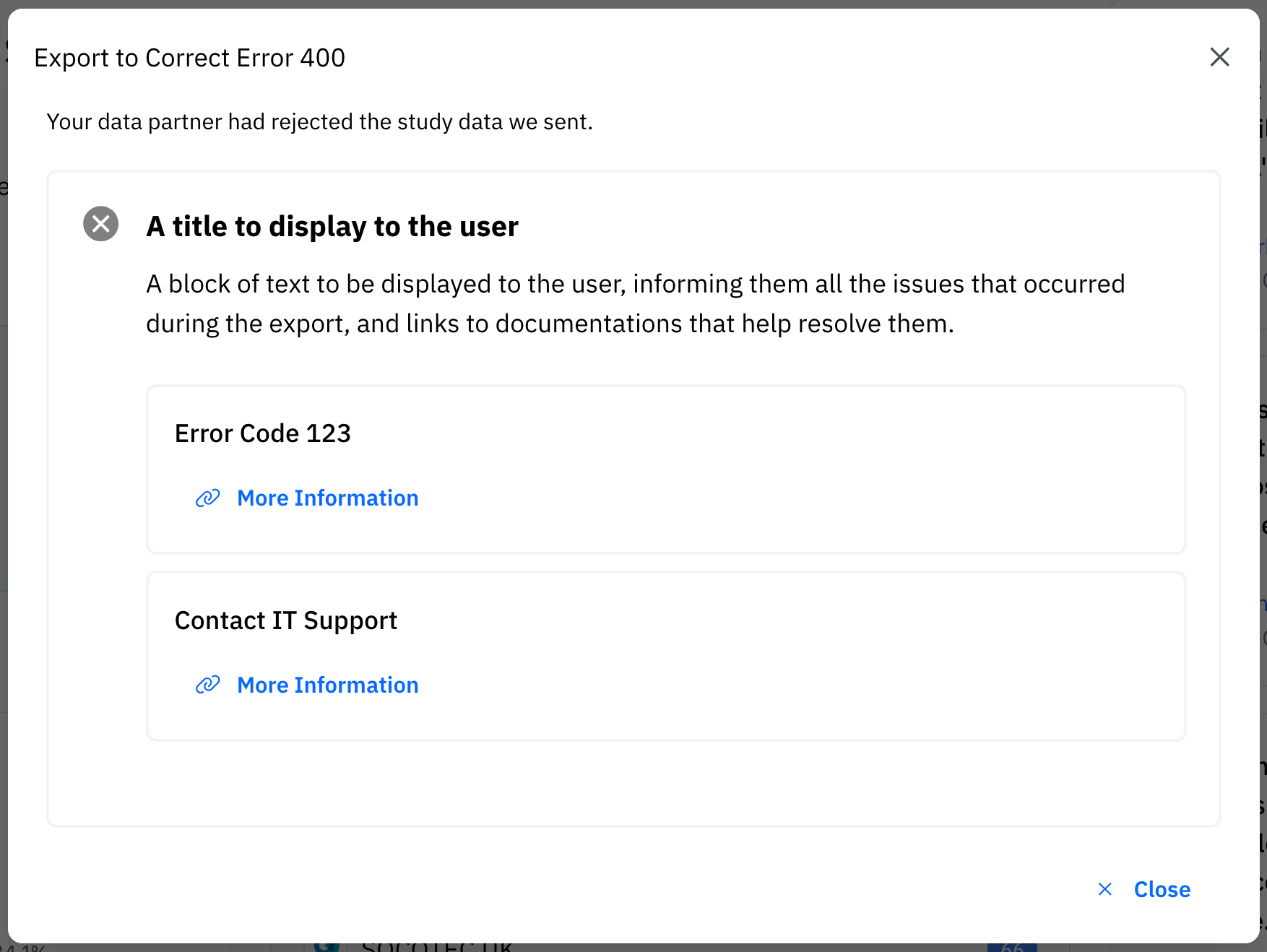
Response status code `400`-`499` **or `207` (Multi-Status)** will be considered a failure. Where possible, the response
body should contain a JSON object with the following schema:

```JSON On Failure theme={null}
{
    "title": "A title to display to the user",
    "message": "A block of text to be displayed to the user, informing them all the issues that occurred during the export, and links to documentations that help resolve them.",
    "references": [
        {
            "title": "Error Code 123",
            "message": "Detailed explanation of the error (optional)",
            "url": "https://your-internal-system.com/docs/error-codes/123",
            "type": "error"
        },
        {
            "title": "Contact IT Support",
            "url": "https://your-internal-system.com/it/contact",
            "type": "info"
        },
        {
            "title": "Simple reference (only title required)",
            "type": "warning"
        }
    ]
}
```

**Reference Object Fields:**

* `title` (required): The title of the reference item
* `message` (optional): Additional details about the reference
* `url` (optional): A clickable URL for more information
* `type` (optional): Visual indicator type - `ok` | `info` | `warning` | `error` (defaults to `warning`)

The UI will render references as collapsible rows with appropriate icons (✅/ℹ️/⚠️/🚫), support scrolling for long
lists, and only expand when `message` or `url` is present.

<Info>
  The above response will be rendered in a modal dialog to the user as:{" "}

  <img width="400" src="https://mintcdn.com/forestreet/pahclZuClwwwBpfa/api-reference/guides/img/export-failure.png?fit=max&auto=format&n=pahclZuClwwwBpfa&q=85&s=0dab42e5f655bbcb53beaaf7a640c4db" data-path="api-reference/guides/img/export-failure.png" />
</Info>

#### On Exception/Timeout

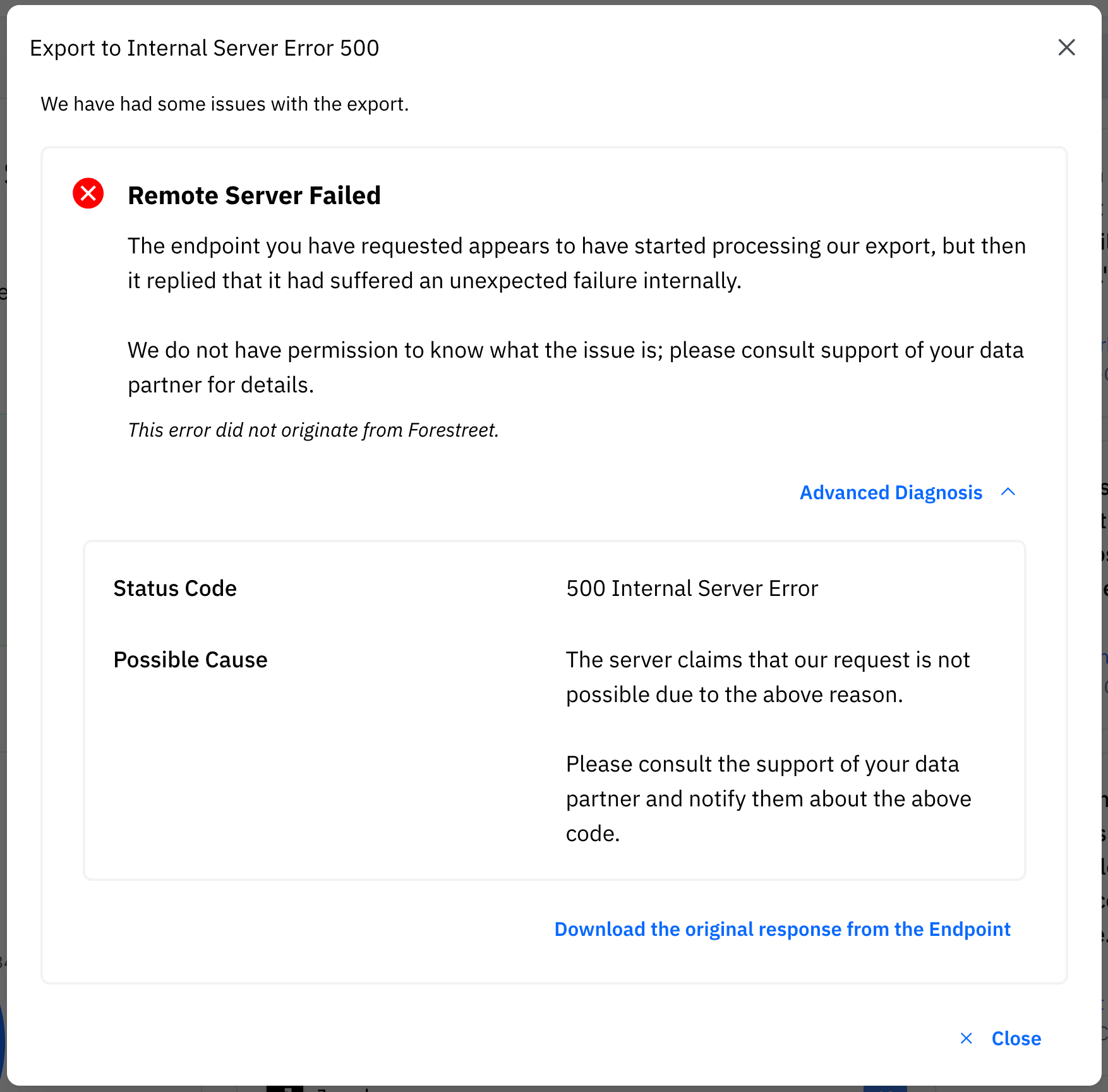
Response status code `500`-`599` will be considered an server side exception. The API will try again immediately upto 3
times using the **same `Idempotency-Key`**.

If that fails, the user will be shown a generic error message, referring them to contact their IT support.

<Info>
  The response contents from your API will not be parsed regardless of `Content-Type` if the status code is an
  Exception.
</Info>

<Info>
  An error message that describes the issue will be shown to the user in a human language.

  <img width="400" src="https://mintcdn.com/forestreet/pahclZuClwwwBpfa/api-reference/guides/img/export-error.png?fit=max&auto=format&n=pahclZuClwwwBpfa&q=85&s=1def4729c05fce9bbd66ea86d413e1bf" data-path="api-reference/guides/img/export-error.png" />
</Info>